
Skip to content
Beta Sender

For Windows PCs

WhatsApp bulk sender for Windows

Beta Sender Desktop runs on your own Windows computer and uses your own WhatsApp number. Start with Pro for one WhatsApp account, or choose Plus for multi-device, account rotation and templates.

Windows only. Need Mac, phone or 24x7? See Beta Sender Cloud.

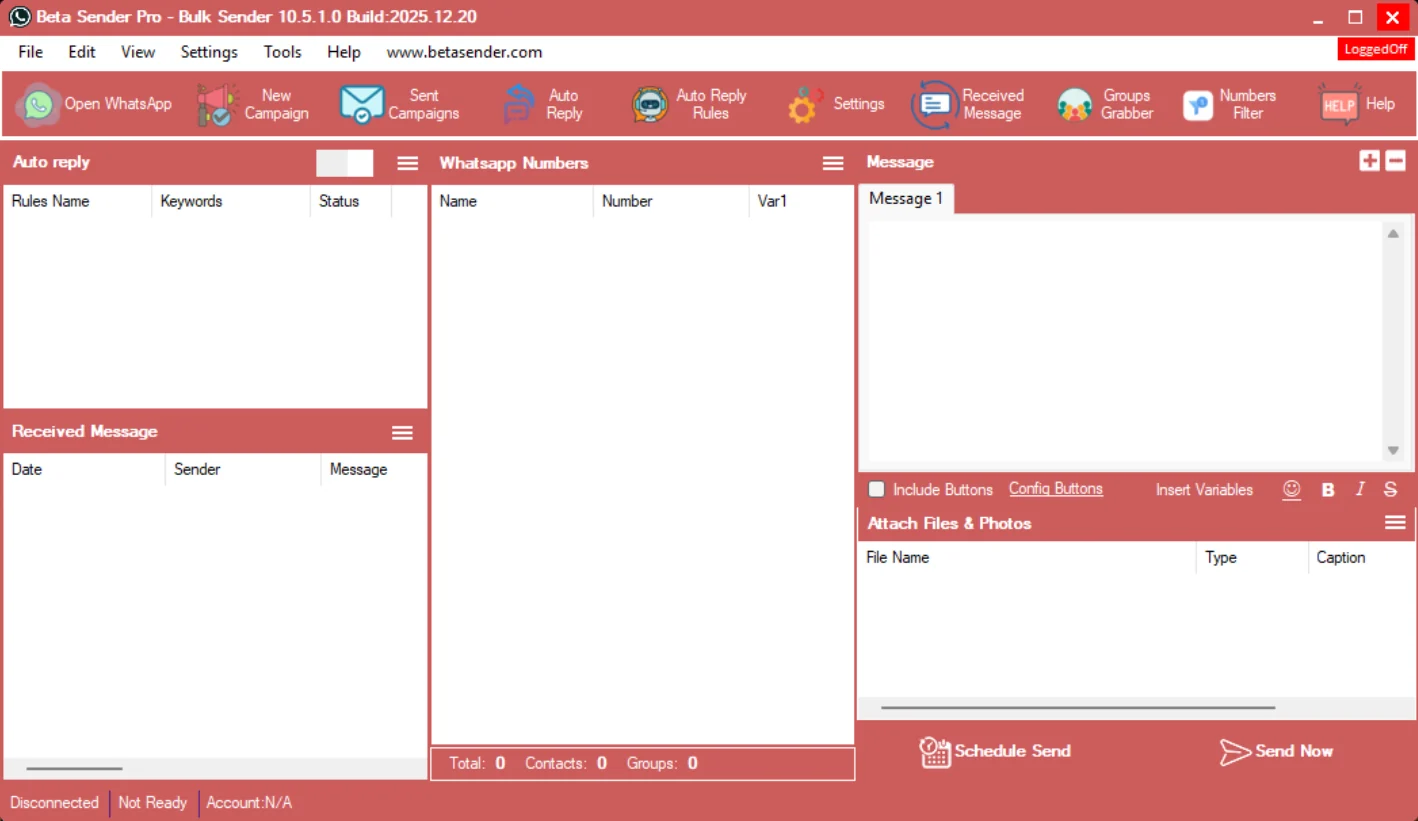
Beta Sender Pro for Windows: toolbar with New Campaign, Auto Reply Rules, Groups Grabber and Numbers Filter, a numbers list, a message editor with attachments, and Schedule Send and Send Now buttons
Beta Sender Pro for Windows

What is inside

Everything on one Windows screen

Contacts, message, attachments, auto reply and received messages sit in one window, so you can set up and send a campaign without switching tools.

  • Send now or schedule

    Start a campaign right away with Send Now, or set it up for later with Schedule Send.

  • Contact list with variables

    Load names and numbers, and use variables such as Var1 to personalise every message.

  • Message editor

    Write with emoji, bold, italic and strikethrough, and keep more than one message in a campaign.

  • Files and photos

    Attach files and photos and add a caption to each.

  • Button messages

    Include buttons in your message and configure them.

  • Auto reply rules

    Set keywords and automatic replies, and switch auto reply on or off.

  • Received messages

    See the replies that come in without leaving the software.

  • Campaigns and history

    Create a new campaign and open your sent campaigns from the toolbar.

  • Groups Grabber

    Pull contacts from your WhatsApp groups.

  • Numbers Filter

    Filter your list of numbers before you send.

Pro vs Plus

Pick the plan that fits how you send

Pro works with one WhatsApp account. Plus is the newer app with multi-device, account rotation, templates and a dashboard.

Feature Pro₹799/year Plus₹1,999/year
Auto reply ✓ ✓
Contact / numbers list ✓ ✓
Groups Grabber ✓ ✓
Numbers Filter ✓ ✓
Received messages ✓ ✓
One WhatsApp account ✓ —
Multi-device (more than one WhatsApp account) — ✓
Account rotation — ✓
Message templates — ✓

Beta Sender Plus

Inside Beta Sender Plus

Plus is built for more than one WhatsApp account, with a dashboard that shows your queue, devices and reports in one place.

  • Multi-device

    Connect more than one WhatsApp account and watch the status of each device from the Devices screen.

  • Account rotation

    Rotate between your connected numbers when you send.

  • Message templates

    Save templates and reuse them in your campaigns.

  • Welcome message

    Set up an automatic welcome message.

  • Auto reply

    Reply automatically to incoming messages.

  • Contacts and unsubscribes

    Keep your contacts in one place and keep a list of people who unsubscribed.

  • Number Filter and Group Grabber

    Check your list of numbers and pull contacts from your WhatsApp groups.

  • Received messages

    See incoming replies inside the software.

  • Dashboard and reports

    Follow messages, campaigns, queue (pending, paused, sent, failed), device status and WhatsApp health, and open reports.

  • AI Assistant

    An AI Assistant that you can switch on or off.

Plans

Beta Sender Desktop plans

Yearly plans for Windows. Message us to get started.

Windows desktop

Beta Sender Pro

Everything you need to start sending from your Windows PC.

₹799 /year ₹999

Save ₹200 on the yearly plan

Get Pro
  • Bulk sender: send now or schedule send
  • One WhatsApp account (single device)
  • Contact list with variables to personalise messages
  • Attach files and photos with captions
  • Button messages
  • Auto reply with keyword rules
  • Groups Grabber and Numbers Filter
Most complete

Windows desktop

Beta Sender Plus

For teams and heavy senders who need more control.

₹1,999 /year
Get Plus
  • Multi-device: use more than one WhatsApp account
  • Account rotation between your numbers
  • Message templates
  • Welcome message and auto reply
  • Contacts and unsubscribe list
  • Dashboard with queue, device status and reports
  • AI Assistant

Choose Desktop if

You work from a Windows PC

  • You want a low-cost sender on your own computer
  • You are happy to keep the PC on while sending
  • You want to use more than one number with Plus

Choose Cloud if

You want it always on

  • You want campaigns to run even when your PC is off
  • You use Mac, Linux, Android or iPhone
  • You want chatbot, autoresponder and OpenAI tools
See Beta Sender Cloud

FAQ

Frequently asked questions

Can't find your answer? Talk to us, we reply on WhatsApp and email.

Which computers does the desktop software work on?

Beta Sender Desktop is made for Windows PCs. It does not run on Mac, Android or iPhone. If you use those, choose Beta Sender Cloud, which works in any browser.

Does my computer need to stay on while sending?

Yes. Desktop software runs on your own computer, so the PC needs to be on while a campaign is running. If you want campaigns to continue when your computer is off, use Beta Sender Cloud, which runs 24x7.

What is the difference between Pro and Plus?

Pro works with one WhatsApp account (single device). Plus adds multi-device (more than one WhatsApp account), account rotation between your numbers and message templates, together with a dashboard, welcome message, unsubscribe list and an AI Assistant.

What can I do with Beta Sender Pro?

Send messages now or schedule them, load contacts with variables, attach files and photos, send button messages, set up auto reply rules, and use Groups Grabber and Numbers Filter, all from one Windows screen.

Will my WhatsApp number get banned?

No tool can promise that. Desktop senders use your own WhatsApp account, so spammy or unwanted messages can lead to restrictions. Message people who expect to hear from you, personalise your messages and keep a steady pace. For large or critical campaigns, consider the Official WhatsApp Business API.

How do I buy Beta Sender Pro or Plus?

Message us on WhatsApp or send us an email with the plan you want, and we will help you get started.

Get Beta Sender for Windows

Tell us which plan you want and we will help you get started.